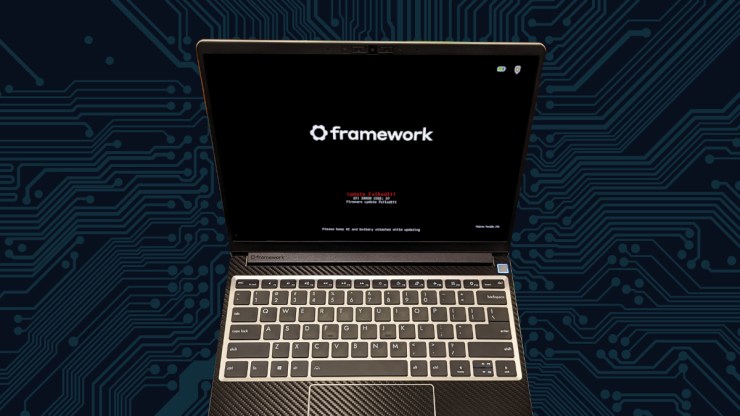
Perhaps the scariest image I have ever seen my Framework Laptop 13 display… This fix is what worked for me, I can’t replicate the problem to verify it but I can tell you that this worked for my machine.
Update: I came upon another issue with the Framework Laptop 13 with the Intel(R) Core(TM) Ultra 7 155H where the retimer portion of the Firmware update failed and I could not fix it. I also lost the ability to use display out on the left side ports of the laptop. I tired every one of my “Sometimes Solution,” going even further down the rabbit hole of fixing update but it did not work. I have renamed the section to “Sometimes Solution” as I think that is more fitting.
Fixing the Failed Update – NVRAM Clear
Sub-heading: Restoring lost functionality on the laptop.
I apparently erroneously published this article about the “fix” for updating my firmware on my Framework Laptop 13 with the Core Ultra 7 155H mainboard. I sat and watched it go through without any “Update Failed” screens and everything was good again. I even manually invoked, in the terminal, the update check to ensure everything was good, but either I was blind or the software lied to me. Either way, an automatic update came down through Discover, on KDE Plasma which broke the usage of my two left ports on my laptop. I was unable to display video out and the way I “fixed” it previously didn’t work.
Should you get into a situation where the BIOS version 03.06 degrades the functionality of your computer. To restore functionality you will have to clear the NVRAM of the system. The only way to do that is to disconnect the battery and drain the system of power. To do this, power off the laptop. Unplug the machine from any AC power sources, open it up and disconnect the battery. Hold down the power button for 30-60s.
Reconnect the battery and reassemble the case or just set the input cover back on the computer and boot. This restored my computer’s ability to display video once again… which, for my workflow is rather important.
Once you are done, be sure to give the screws a good tightening as to avoid any mechanical mishaps by forgetting this step. The magnets will only work so well for so long.
Lessons Learned
With the help of using some AI tools to troubleshoot this issue, here is what I have learned. I lost video out due to a failed BIOS update via fwupd on openSUSE Tumbleweed leading to the EFI Error Code: 07 for both Retimer Port01 and Port23 (presumably each side of the machine. This error persisted whether or not I used the EFI Boot option or the fwupd methods. Looking through the Github, others have corrected this issue in a variety of ways, one of which is the “Sometimes Solution” I previously published.
For now, I will be disabling any automatic firmware updates on my machine as I don’t want to have to trip this again. My machine is happily working once again and I am very happy. This doesn’t change that I still believe that the Framework Laptop is the best laptop you can buy in features, build quality and upgradability.
As an additional aside, if you want some fun terminal commands I learned to dig into your machine here they are:
sudo dmidecode | grep -A3 'Vendor:\|Product:' && sudo lshw -C cpu | grep -A3 'product:\|vendor:'This will tell you all the fun bits about your machine’s BIOS vendor, release date as well as the product name and such. Here is what mine looks like:
        Vendor: INSYDE Corp.
        Version: 03.06
        Release Date: 08/08/2025
        ROM Size: 16 MB
       product: Intel(R) Core(TM) Ultra 7 155H
       vendor: Intel Corp.
       physical id: 4
       bus info: cpu@0
       version: 6.170.4
If you would like to filter out all the information in your kernel messages concerning: Thunderbolt, USB4, retimer, drm, display and port run this:
sudo dmesg | grep -iE 'thunderbolt|usb4|retimer|drm|display|port'If you would like to see all the devices that the Firmware Update Manager, manages:
fwupdmgr get-devicesI do want to note, one should not just run any command they find out there on the internet. I am not just “some guy” but you really shouldn’t trust me either. Please feel free to run this through some other expert or an AI chatbot of some kind to verify that none of this is harmful to your computer.
Sometimes Solution
I have a Framework Laptop 13 with the Intel Core Ultra Series 1 mainboard with the Ultra 7 155H CPU. This has been a great upgrade from the Intel i7-1360p mainboard but had a slight issue. For the last several weeks, I have not been able to upgrade the firmware on this machine. It would fail whether I used the firmware update manager (fwupdmgr) or downloading the update using the UEFI Shell Update. Some of the components would finish but not all and I had not been able to fix this which was causing me to have issue using the left-side ports on my laptop from utilizing a dock station or DP alt mode. This was a problem because I use nearly every bit of my laptop’s capabilities, nearly every day

Reading through this forum post, I had some new hope, because I was not the only one with this issue:
https://github.com/FrameworkComputer/SoftwareFirmwareIssueTracker/issues/47
I disabled secure boot entirely but that didn’t fix the update problem either. I went through many iterations of attempts and fails. Since I generally have my laptop docked, I first tried to moving the dock to either side but this didn’t solve the problem. I would still get “Update Failed.” Whether I used the Firmware Update Manager or the UEFI shell, the update was just completing successfully. I was rather frustrated but because I know that Framework is an excellent company and stand behind their products, there was a way or going to be a way to get this done.
Rather than bore you with every iteration that I attempted, I’ll cut to the end of the story and tell you that I used the UEFI shell on a USB flash drive, formatted using FAT32 and had the computer plugged into ONLY power on the right-side of the computer.
The instructions are published here:
Failed Update
Final Thoughts
It was a small bump int he road but not a catastrophic one. I don’t know what the issue is exactly with this update but I am pleased to say that everything is operating, tip-top once again. I don’t know how useful is for anyone but hopefully it can help to provide a possible solution for a similar problem.
I have learned some things, and now know just a bit more about my beloved Framework Laptop. I will continue to boast that this is the laptop “framework” of the future and as long as Framework the company continues to be awesome, I will continue to give them my business.
References
https://community.frame.work/t/framework-laptop-13-intel-core-ultra-series-1-bios-3-04-release/59579
https://github.com/FrameworkComputer/SoftwareFirmwareIssueTracker/issues/47
Leave a Reply