
LocalSend is a the AirDrop for the rest of us. The ability to easily send files to other computers or systems that are local to your network. This is also cross platform, so whether you are on Linux, Windows, macOS, Android, or iOS, this will work for you. It really couldn’t be much easier.
Bottom Line Up Front: LocalSend is poised to be my go-to solution for sending one-off files to nearby systems. Although I am primarily on Linux for just about everything, I do have the Android and Windows system that are in my orbit more often than I would like. This is going to be my solution for sending the necessary file because it is just so easy to do. Truly a valuable tool that facilitates the easy transport of data.
Installation
I have two options here on openSUSE Tumbleweed, I can go with the Flatpak or AppImage. Certainly, if you are running a Debian based Linux distribution, Ubuntu, Debian, Linux Mint, MX Linux, etc, there is a deb option and for the more hands-on, industrious, a tarball can be used as well. LocalSend can easily be installed in Arch through the AUR as well as Nix using the Nix way.
https://localsend.org/#/download

I ultimately chose the AppImage because it looks WAY better than the Flatpak and although I don’t get hung up on such things, generally, this is pretty significant. LocalSend in an AppImage looks like it fits into my Plasma theme. It also doesn’t have the white title bar which really sticks out so I will use the AppImage with this application.

Of course, if you prefer the Flatpak way of doing software, feel free to choose that. In this case, I do trust the developers here and I am not worried about naughty behavior.
Firewall Settings
Before you can have fun with LocalSend, you will need to make some modifications to your Firewall. The Firewall will require you to open up two ports: 53317 tcp and 53317 udp. Using firewall-config, I adjusted the various Zones to have those ports opened up.

The terminal method, for those that prefer that sort of interaction:
sudo firewall-cmd --zone=public --permanent --add-port=53317/tcp
sudo firewall-cmd --zone=public --permanent --add-port=53317/udp
You may need to reload the firewall service for settings to take affect.
firewall-cmd --reload
Now you are ready to use the wonders of LocalSend!
Features
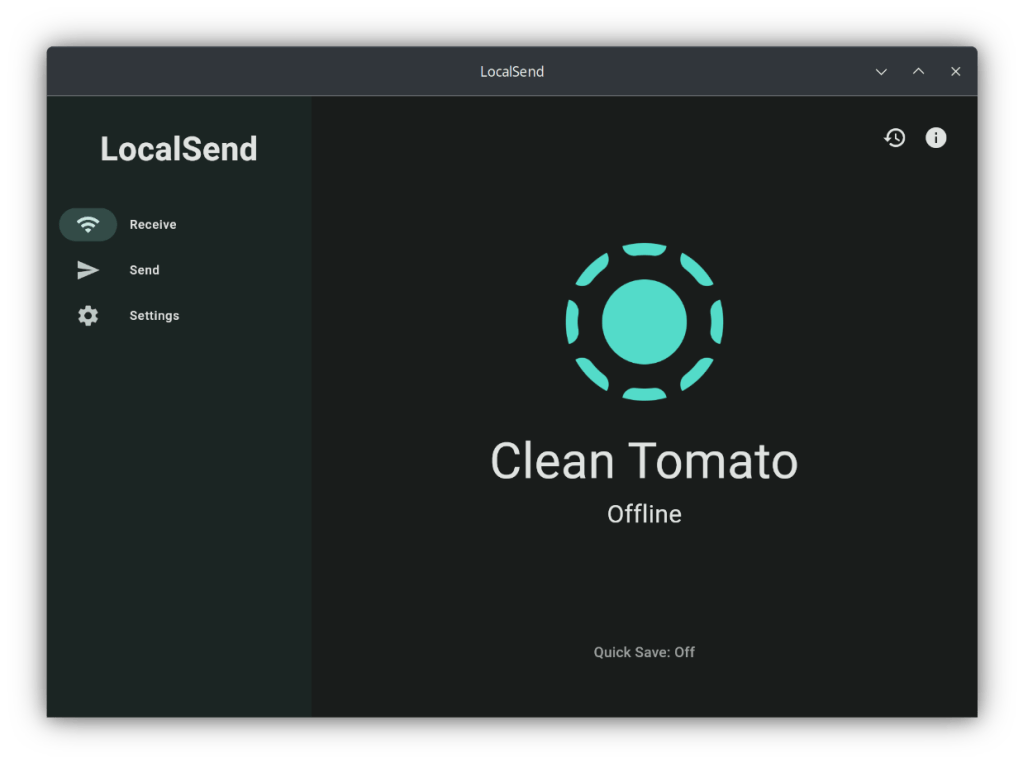
There are two features of LocalSend, to either Receive or Send files. Maybe that is one feature but I’ll call it two. When you launch the application, you will be presented with simple set of options with your status and the name of your system, as seen by other LocalSend clients.
On the machine that is going to receive the file, just leave LocalSend on the Receive section of the applicaiton. The LocalSend logo will spin as it patiently waits.

You are not forever tied to the assigned name, it can be changed but more on that later.
Send
When sending a file, select the Send side-menu item. Search for a payload of your choice, which is pretty amazing, really, and send it to the Nearby device that is available to your system. It is truly that simple.
This is pretty self-evident but just in case, I’ll break this down.

File, sends a file of your choice to the destination system. The Folder option, is just that, you can send the contents of a folder to the destination machine.

Fantastically, you can add other folders or files but also, you are able to send a text message to that machine. This can be done on its own or along with the collection of files.

Lastly, the Paste option allows you to send whatever is in your clipboard. That can be an image, text, whatever you may have in there.
When you are ready to send, select the nearby device or alternatively, if it just isn’t showing up because there is something screwy with the network you are on, you can enter the IP address manually.

Clicking on the Nearby devices of your choice will begin the sending process. Note that the recipient machine will have to approve the transfer before it begins.

Settings
I am going to cover everything in the settings menu but I do want to highlight some tweaks that I made to make LocalSend work a bit better for me.

What you see here is default except for one change. I toggled the option, Quit: Minimize to Tray/Menu Bar. I decided this was important because it works much better for me to have LocalSend hang out in the system tray instead of having it in my task manager. I do realize there are some desktop environments that don’t have a task manager so this looks like it will also minimize itself to the tray as well making it multi-desktop-functional and everyone is happy.
I do want to note some other nice features here. If you do not want to have to confirm receiving a file, you can toggle the quick save and you can also send the Destination to another folder besides Downloads.
Another toggle that might make life a bit easier for you to send files is the Auto Finish option. Normally, when the file received is successful, it will leave LocalSend on a screen for you acknowledge the transfer has completed.

Other settings of note is the ability to restart or stop the LocalSend server. Below that you can rename the device as well. So, if “Clean Tomato” or “Fantastic Pineapple” is not to your liking, a custom name of your choosing can easily be input there.
If LocalSend is something you end up using, consider tipping the developer as a thank you for a productivity tool.
Advanced Settings

I haven’t made any changes in the advanced settings but that doesn’t take away that these would be quite valuable to have handy, based on your use case. One of the great features of LocalSend is that the developers have realized that not everyone will use their app in the same way. For example, there is an Auto accept via link option which is handy if you have machines you need to do regular file dumps on but don’t want just anyone to have that ability. If you have a large group of you using LocalSend and they want to just drop a bunch of unwanted pictures on your machine, that could cause some serious irritation.

Another nice feature here is manually assigning the Device type. This particular machine is a laptop so that makes total sense to have a laptop there. One of my other devices is a mobile device and what looks like the ubiquitous candy bar style, boring cell phone is shown.
I’m not quite sure why you would want a globe or command line icon, even if they do look cool and lastly there is the depiction of a server. I do notice there seems to be the lack of a desktop computer icon. We do still use those, do we not? It would be nice to have a custom icon option for this but maybe that would introduce a level of complexity and perhaps vulnerability in how this works. Also, some people are just awful so that could be a problem too.
As far as changing the address for Multicast, I have not messed with that because what I have now is working perfectly. There is no need to mess with it but I am glad to know it is there. It might provide value to someone else.
Privacy and Security
It should be noted that this, being an open source application, you can personally audit the code but in short, LocalSend does not collect or store any data. The full policy can be reviewed here but suffice to say, you are pretty safe in the privacy aspect.
As far as security is concerned, nothing that transmits data across a network is fully secure and impervious to being compromised but LocalSend does make reasonable attempts at ensuring that your data is encrypted by default. You can make it less secure if you like but that would not be recommended.
What I Like
LocalSend is easy to set up, easy to use and has enough features to do the job that needs to be done. I would call this application feature complete or near-complete because there are probably some other closely associated use cases I am not thinking of that could be added to this application.
Nearby devices will just show up, almost magically. Although, there seem to be some times when to don’t show up magically but you have the option to easily punch in the IP address and even make that address a favorite, right from the Send Files work flow. Sure, it may be annoying when the machines do not see one another but there is a very easy way to mitigate that small problem.
The automatic assignment of silly names is brilliant. Most applications would just pull your hostname and that would make sense but it is great that this gives you one layer of obfuscation of who you are on the network. So, nicely done… but I will probably just change mine to be my hostname because I have a simple mind with simple needs.
The flexibility of sending a single file, folder, your clipboard contents or a text is fantastic. The text is literally just a message but it isn’t saved anywhere. You can copy it but it is not saved in your history files at all.
This is cross platform, whether you are running Linux, Windows, macOS, Android or iOS, this will work for you. Since LocalSend is available as a Flatpak or AppImage, any modern Linux distro will be able to make use of this. Now if only there was a Commodore Amiga version…
Combining this with Tailscale and you can extend the reach of what is “Local” and be able to send pictures, documents, files of any kind to anywhere that is on your virtual local area network. It really does open up some possibilities.
What I Don’t Like
This is a small criticism but you can only do one operation at a time so if you are in the process of receiving any files, you can’t do anything else with the application. This isn’t a huge deal with generally small files but if you are sending anything large
I have had issues of the devices finding one another. Sometimes it is a bit slow which is why it is nice to be able to send to an IP address or even use the favorites feature so that I can easily send it to a machine. This will have to be investigated further as I can’t seem to nail down the problem.
I do wish the Flatpak version of LocalSend looked better. This is just an annoyance but still… annoying. I like the eases of updating Flatpak but I don’t like the way Flatpak looks so out of place at times.
Maybe it would be trivial to accomplish, but it would be good to see LocalSend available on the various BSDs and Haiku OS. I’m sure it could be compiled to the other platforms but it just isn’t currently available. This is not a concern for me at this time but it did give me pause. I am also not sure on the status of Flutter on these other platforms so that would be a limiting factor.
Final Thoughts
LocalSend is absolutely a fantastic application and has so much potential to make the movement of files around from one machine to another much more convenient. It is like Airdrop but much more functional and not dependent on a single platform. LocalSend, also being multi platform makes this a useful tool for the various, common, modern platforms out there.
References
https://localsend.org
https://tailscale.com/
https://flutter.dev/
https://localsend.org/#/privacy


Leave a Reply