
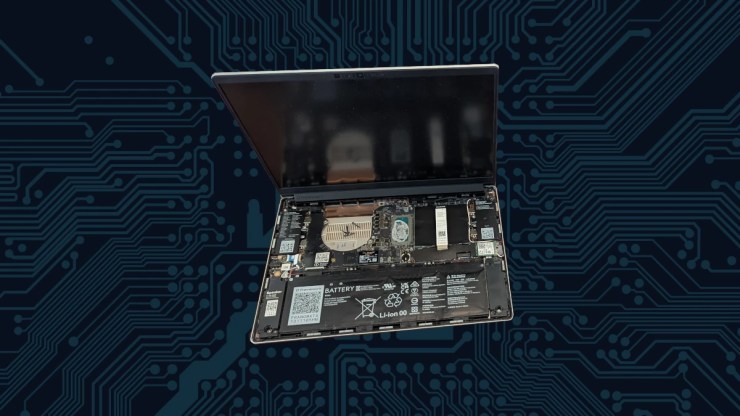
My day started like most weekend days, I typically have a nagging tech curiosity that I want to hammer out for which I was making good progress. Not an important one but it involved Quickemu and an operating system that I am not particularly fond of or have really spent much time with. I noticed that the fan on my Framework Laptop 13 was starting to make a whining noise that became an unwelcome soundtrack to my day. Since Framework has made servicing this machine so easy, I decided I was going to remove any dust or debris from the inside of my computer to free the fan of its irritation.
It’s pretty exciting that Framework has made a laptop you can easily work on, ultimately allowing their users the ability to better maintain and keep their technology operating much better for longer.
I had a few minutes before the pizza needed to be removed from the oven so I packed up my laptop and went out to my lab to remedy my machine of its dissonant jingle.

The Misstep
I have not been one to use those cans of compressed air because I don’t like spending the money on cans of air and I have an air compressor that provides me all sorts of air for all sorts of activities. I have cleaned out many dustopias of digital devices like servers and desktops, I didn’t think much of cleaning out the fan of my Framework with this same solution.
Having already removed the 5 captive screws on the undercarriage of the portable digital workhorse, I set out in on this winter day a 285 feet long journey from from the house to CubicleLabs to remove the cause of that new grating tune.
I opened up my modular marvel and realized very quickly I made a horrific and catastrophic mistake as I watched the fans spin, they began to shed their fins.
I was in trouble.

My previously pristine, portable powerhouse, the Framework 13, now presents a plethora of problematic, pesky, and plainly pathetic performance pitfalls, postulating a profound predicament. I can’t run this machine without a CPU fan… at least, not the way I use it. I was unsure what I could possibly do. I can’t even go the rest of the day without it and I have failed to maintain another machine in parity of this one that could at least pinch-hit should that be necessary.
The Quick Fix
Being in quite the pickle, knowing that I would not be able to overnight a new part for my Framework and I can’t exactly walk into a near-by Best Buy to get a replacement fan, I had to do the shamefully unthinkable and pilfer a fan from the Framework 13 mainboard I have in a 3D printed computer. I was a bit unsure if the 11th Generation Intel mainboard heatsink and fan would be fully compatible with the 13th Generation Intel mainboard but I didn’t see much of an option here and had to go for it.

Thankfully, the fan was compatible, although it looks like they have different part numbers, perhaps there have been some changes, but the interfaces were identical and the fit was perfect. The actual fix didn’t take long at all, about 15 minutes, and my repairable rig was running once again.

I do feel bad about what I have done to my other wonderful machine but I was left with little choice in this matter. I will get those parts ordered soon, along with some spares, perhaps.

Lessons Learned
Lesson 1: Compressed air is not always the friend of delicate laptop parts. Although, I am not sure how I would have removed what looked like a dust bunny jammed in the housing, I should have not been in a hurry. I should have, alternatively, taken the fan apart and removed the build up inside of it with soft brushes or other tools that are suited for this task.
Lesson 2: There is value in having spare parts. Since I have a proclivity to be a bit hamfisted and slightly too excited, spare parts would benefit me greatly.
Lesson 3: Don’t intermix tech repairs with making pizza for the family. Rushing between soldering a fan and tossing dough can lead to both burnt circuits and burnt crusts. Keep your tech tinkering and culinary arts separate to avoid a recipe for disaster.
Final Thoughts
I was very fortunate this time. Thankfully, I had a machine that could sacrifice it’s parts for the good of my profession. While my head raced as I sweated bullets as to what my course of action would be in this misstep, I am reminded that I need to slow down and not charge head first into a task that required a more delicate hand.
This also reminds me that I need to have parity in another work machine, should I have another catastrophic event with my technology. I have a Lenovo P16s that is fully capable, albeit not as nice of a machine to do everything I am doing on my Framework 13. I do believe that I would be wise to spend a day to get this other machine up to speed.
It would also be wise to have some critical parts in stock should there be another catastrophic incident. I’m not exactly sure what else one should have but the Heatsink and Fan assembly is a good candidate, just based on this. Batteries may be a good one too as I just noticed that my battery is getting a bit puffy.
Technology should be fun and companies like Framework do make it fun, to provide such empowerment in being able to fix and maintain your machines. Take this as a cautionary tale of being delicate and not hurried when performing on delicate equipment. The Framework 13 is a somewhat rugged machine but when its protective shielding is removed, it is as vulnerable as any other pixel pusher you may have in your electronic menagerie.

References
https://guides.frame.work/Guide/Heatsink+and+Fan+Replacement+Guide/84
Framework 13
Six Monitor Workstation for my Framework 13
dbrand Framework 13 Skin
Leave a Reply