
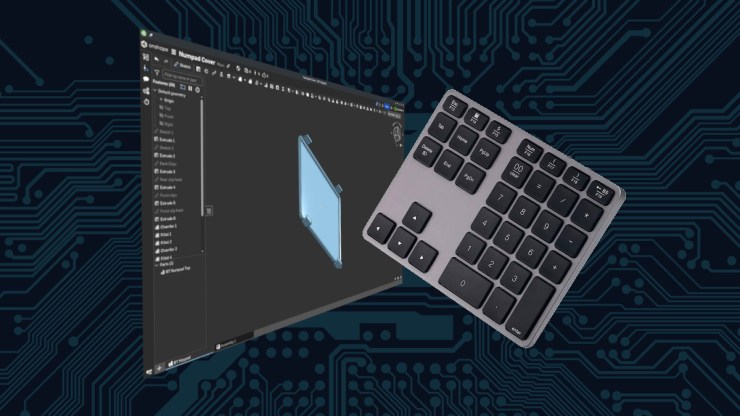
I much prefer the smaller laptop when I travel. I am often a digital nomad, lately and the Framework Laptop 13 has been a great road warrior for me for the last two years. The problem with a smaller keyboard is that sometimes, you need a number pad. I set out to find a number pad that would as closely match the the Framework as I could that was also nice, thin and transportable.

The way I see it, a small, thin and light laptop is the only way to go when traveling, especially on an airplane and everything is in your carry-on luggage. To complement the thin and light laptop, I purchased this number pad.

I haven’t been able to find this exact model on eBay or Amazon, but there are similar models. The nice thing about this number pad is that it is fairly close in key size and feel to the Framework. What I do like about this number pad is the extra keys beside the 10 key. The arrow keys are handy as well as the page up and down. Some of the extra keys on here don’t seem to work quite as expected and my thoughts for using this to drive a bunch of desktop shortcuts fell through but that is not important. Like the Framework Laptop 13, this number pad has five standard sized keys and the top, 6th row is half size so it fits. What the problem became is that I didn’t want to transport this keyboard with out some sort of protection of the keys because I tend to be a bit rough on my things when they travel.
Why I Bought It: Solving a Real Problem
Small laptops are great but number pads are also great when you are doing some number crunching, in my case, light accounting on spreadsheets. You know, the fun stuff. Sure, you can do it with the numbers along the top of the keyboard nestled, between the function keys and qwerty row. When searching eBay and Amazon for a number pad, this particular model caught my eye. It was a 10 key along with the inverted T cursor keys, and some bonus page up/down along with home and end.

I have not been able to find another exactly like this one but here are a couple links of models that are nearly
https://a.co/d/h4mxfTO
https://ebay.us/m/sBxXb9
The unbranded keyboard has a quality feel and paired without problems to my openSUSE Tumbleweed Linux Laptop. They key travel is just as I would like the cursor keys come in handy but the real important part of this is the 10 key for punching in numbers.
The Good Features
Bluetooth is a must. Little laptops are not generally adorned with many ports and the convenience of Bluetooth makes using this as easy as flipping a switch. The compact size allows me to easily transport it, the battery lasts for months and the key travel is satisfactory. It’s not as good as a mechanical keyboard but it does the job quite respectfully. As I’ve mentioned earlier the key layout and matches the laptop nicely and I can happily use the number pad with my left hand as I have the flexibility to place it wherever suits me.
Unfortunately, the F-keys don’t work as I would like but with the help of input-remapper I have added functions that I haven’t really used. The additional keys are great, but I really don’t use them much. Largely this number pad lives in my lab which is my one of three places my Framework sits to work but the key feature here is the portability.
The Cover Idea: Protecting My Investment
Granted, it isn’t a huge investment but I do want to keep the number pad in good shape and protect the keys. Stuffing this portable pad of keys in my bag leaves it open for things to come between the keys and this is an unacceptable situation. So, I set out to design and print a protective cover for it. With the help of a metric ruler, OnShape and a 3D printer, I was able to measure out, design and print a convenient, snugly fitted lid that turned out great, after two small changes.

The design I went with was to have the lid hook onto the front and clip over the back. It seemed like the cleanest method to securely attach the lid to the number pad.


Now taking this with me on a trip poses very little or at least greatly reduced risk of causing this highly useful, 35-key, human-interface device well protected.
Download
If this is something that would work for you, you can download it from:
– Thingiverse.com
– Printables.com
– Cults3D.com
I printed this at 15% infill with PETG. The color you see is transparent or natural.
Final Thoughts
My handy little Bluetooth gadget is now protected from my mishandling. Thankfully there is technology out there available to help me design and produce something to protect my technology.
References
https://github.com/sezanzeb/input-remapper
https://cad.onshape.com/
Leave a Reply