
I am a Framework Computers enthusiast. My Laptop 13 is my daily driver has become a road-hardened, traveling partner, reliably working from home, at the office, in the airport and sits perfectly on the tray in the airplane when I am trying to hammer out some documentation, or queuing up a bunch of emails. It’s not all work tho, I do have fun with this traveling titan as I have been known to play a few games on RetroArch or Steam and when I am going to play a game, a good mouse is a must, at least for those games I enjoy most and what would be a great addition for playing or working hard with my Framework Laptop 13 would be this DongleHider+ expansion card. I use the Logitech M720 Triathlon mouse as I haven’t found a better mouse. I generally connect it via Bluetooth because a dongle in my USB port is a bit unsightly against the clean lines of the Framework Laptop 13 and I often need that USB port for something else. The DongleHider+ would be the perfect expansion card to add to my growing collection of interchangeable parts.
The Dongle Dilemma
Of all the USB dongles out there, Logitech does you well. They are low profile and don’t put your computer at risk by leaving it in. The fantastic engineers there seemed to have taken the risks into account with their current generation of dongles. I couldn’t be any happier with them, physically.
Historically, I have generally kept the dongle plugged into my dock station as to keep the ports clear, as much as possible, on any of my laptops, this is also quite true of my Framework. I keep 2 USB-C ports, 1 HDMI and 1 USB-A as this is the perfect mix of ports for most instances. There are times when I pull the HDMI (probably the least used port) and toss in my MicroSD card or a second USB-A when the situation dictates. That said, I don’t have room in my life for a dongle, my ports need to be dynamic. I don’t want a permanent fixture in any ports. Even small, teeny tiny dongles do not work well for me. Some of them are hard to take out of the port they are so small which makes it perfect to fit inside a Framework Expansion port.
Is the DongleHider+ the Answer to All My Problems?

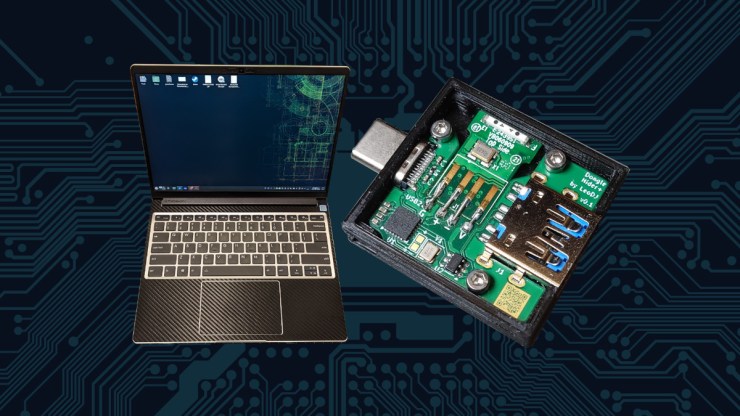
Here is a rendering of the expansion card. When freed from its outer shell, the dongle is small enough to fit inside the expansion card with enough space to still have a USB-A connection available for whatever you still need to plug into your machine. In effect this is as good as having a USB-A expansion card plus more!

The assembled version of this shows de-robed dongle soldered inside of the expansion card. It’s a tight fit but it isn’t alarmingly tight. This is a very “doable” and reasonable card that looks as though it could be mass produced without too much difficulty.
The way I see it, I could have my cake and eat it too with this. I keep my USB-A port and get a bonus Logitech dongle for my mouse. I would get that instant response that I love about the wireless devices. I don’t have to wait that second or two for the Bluetooth to activate and connect. I’m immediately connected when I touch the mouse which would be a welcome change.
This is certainly not the answer to all of my problems but this clearly would ameliorate one of my less than ideal technical decisions that I work with daily. Waiting for a Bluetooth mouse to activate is not a huge deal but every once in a while, it is somewhat annoying and to remove that annoyance would just make my work more enjoyable.
Why this Screams “Official Framework Product”
I don’t know what sort of hurdles would be required to get an official product with a Logitech Dongle, there are some clear challenges there with it but let’s imagine here, for just a moment. Let’s pretend that there weren’t multiple dongle technologies Logitech has and they agreed to partner with Framework on this one, providing their universal receiver to encourage Framework computer owners to pair their special edition Logitech mouse with the same design language as Framework computers for the perfect mouse and keyboard set for the serious modular maestro or tinkering trailblazer.
Maybe, just maybe, Framework could team up with Logitech for a series of branded wireless peripherals that integrate not only into the Logitech vast catalog of incredible offerings but also a whole line of slick, quality crafted and repairable Framework ethos devices. Framework recently released their mechanical key switch module, this might be a great use for a full sized keyboard wireless keyboard. After all, one’s “battle station” really should have matching peripherals, right?
Known Gotchas
This is a community project, so it isn’t going to be a perfectly flawless experience. If you want to make one for yourself, that isn’t a problem but you do have to disassemble a dongle and print a shell of your own for this to fit in your Framework laptop. This could be a fun weekend project, of if it is like most of mine, a two day project spread over two weekends.
There is another known bug, which is known on AMD devices but untested on Intel devices. The quirk is, when plugged into a “USB4” capable slot, the internal dongle drops out when plugging in USB3 devices. So, plugging in another peripheral that only negotiates for USB2 would not be a problem. The upshot is, the dongle does recover upon unplugging the USB3 devices. This also doesn’t happen on non-USB4 bays. Thinking about this, I think my Intel Core Ultra Series machine running openSUSE Tumbleweed would be a great place to test out if this also happens here.
The power draw of this device, with only a dongle active, the CH334 hub IC draws around 20mA. The Unifying dongle uses an additional ~25mA of power draw. It seems like very little and can draw less if the Expansion Card is left idle but with the dongle remaining in use as a mouse is unlikely to stop moving for an extended period of time, the power draw is going to be an estimated 45mA, if the numbers hold true.
There are some challenges here but the easy workaround would be to just use a port without USB4. On an Intel Framework 13 this may not be possible and may not even be a problem as it is untested. I think it would be a worthwhile exercise.
Final Thoughts
One of the best things about the Framework laptop, outside of the ability to personalize the ports for your needs and repair it with ease, is the open nature of the platform. Framework has given us a fantastic platform and easily add to its richness of functionality. I love these sorts of projects where a very clever individual has designed a solution to a universal problem.
I don’t know that this dongle would be a high payoff for Framework but I certainly would appreciate it. There are a few technical issues that have to be worked out and the actual execution of it has its challenges, unless they could get Logitech involved. It would really have to be bundled with at least a mouse or mouse with keyboard to be worth while for the consumer. As of today, this is a great device for the right Framework user. I hope to see more of this!
References
DongleHider+ Framework Laptop Expansion Card
Framework Computers
openSUSE Project
Leave a Reply