Over the years I have had struggles and great success with installing Linux on various machines. Some hardware I like to work with more than other bits of hardware. Here I will discuss specific issues with bits of hardware and machines and how to overcome challenges. Although, Linux will run on just about anything, some hardware is better suited to it than others. Here are specific hardware experiences, what I like, don’t like, work around issues I have overcome with some “obscure” bits of hardware and just general experience with running Linux.
Originally I have only kept notes for myself on working with various bits of hardware. This might be useful for your Linux journey. My hardware is all fairly old, ancient by some standards but it still gets the job done. When these machines break down or are no longer able to do the job I request of them, they will be replaced. I guess that makes me not the ideal consumer. As a rule, I don’t like to throw something away until it is no longer useful or not practical to continue maintaining.
I have found that Dell seems to just work with Linux, no tweaking necessary unless there was a Broadcom wireless driver to install. I am also extremely appreciative that they have been using the same power supply barrel connector for years, so I always have a power supply somewhere.
Framework 13

The Framework 13 is my new favorite machine to take with me on the road. I am so impressed with the design. From just the visual aesthetic to the fit and function of every component on it. The modularity, repairability and the premium quality components makes this the best laptop I have ever owned. Having now used it for over 9 months. I am just as happy, if not happier than I was when I purchased it.
C64x

This is my purpose built desktop, AMD Ryzen 5 3400G based, retro-modern machine that is my primary production system. Most of my work is performed on here from video editing, live streaming, and the like.
Dell PowerEdge R710
This is my latest server build for my home lab. It’s a bit older but I have put enough into it that it works really well for me. It has also been a valuable machine to learn and understand more about server class hardware.
Atari VCS
A great casual gaming and home theater PC running openSUSE Tumbleweed. It’s a great looking machine that packs a lot more punch than one might assume.
Lenovo ThinkPad P16s Gen 1

This machine was assigned to me by my current employer and was equipped with Windows 11. It was so horrendously slow and awful that I decided to spend a few bucks and replace the NVME storage so that I could see how it ran with openSUSE Tumbleweed. Overall, I think this is a decent machine albeit a bit large for my liking. I don’t have any articles about the openSUSE experience, other than some issues I was having with the keyboard’s trackpoint device not functioning. I have since had the keyboard replaced.
Disable Input Devices in Wayland
This machine isn’t too bad to service but it is certainly not in the same league as the Framework. The keyboard on this machine is also pretty decent but not as nice as some others. I do like this machine, it runs openSUSE Tumbleweed quite nicely and is a great stand in to use from time to time but isn’t exactly a joy to use like some other machines. It is certainly a lot more usable running Linux than it is running Windows. It certainly feels a lot more “Linux first” than it does “Windows first.”
HP EliteBook 840 G7

This was my primary system from November 2020 to June of 2023. This displaced the Dell Latitude E6440 as my road warrior but the E6440 is still used pretty actively. The HP EliteBook has a lot of great things going for it. The battery life gets me between 4 and 6 hours, depending on what I do with an 80% battery life left. Although this thing has a barrel jack, I find that I use the USB Charging port mostly. This is the first machine I have had that I can quite literally charge it from any USB-C brick or even a vehicle socket provided in newer cars. This machine was replaced due to multiple keyboard failures. Once I fix the keyboard again, I will put it back in service. I just have to carve out the time.
Dell Latitude E6440

This machine was my primary machine from March 2017 to November 2020. Although this doesn’t travel anymore, it is still actively used for Minecraft “LAN parties” and also acts as a node for file synchronization. Intel Core i7-4610M, 128GB mSATA, 500GB SSHD drive, 1080p screen with the AMD GPU. It is running openSUSE Tumbleweed flawlessly. Most notable feature is the dock station ability. Very convenient to go from desk to lap with just the push of a button for separation and other accessories available for t his E-series of machines. This runs KDE Plasma Desktop which is not phased by the dock to undock. It flawlessly updates my screen layout and remembers each screen “location.” Everything worked on this machine without any tweaking. This is a large part of why I recommend Dell Latitude series of machines.
Dell Latitude D630

My previous main Linux machine that I purchased in 2007 that just keeps chugging away. It is currently running openSUSE Tumbleweed but spent most if its life running openSUSE Leap or the previous static release of openSUSE. This machine was my travel and work companion from July 2007 to March 2017. If not for the Nvidia GPU on this, I would still be using it. It still performs most tasks quite well but the issues with the video performance is essentially a show stopper.
Dell Inspiron 20 3048 All-In-One Desktop
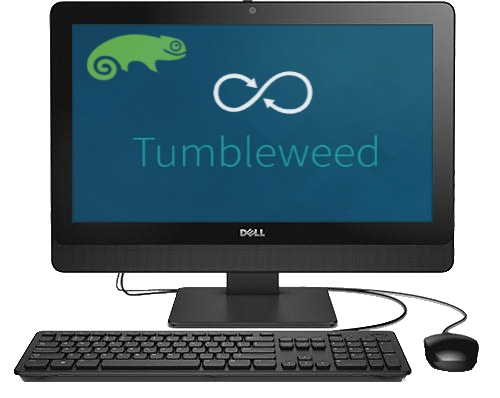
This machine serves as a kind of dashboard display, kitchen helper and live backup of my main system. It has been in service since December of 2018, received a few upgrades and is continuing to function spectacularly well as a kind of kitchen helper. I don’t use it as much for its calendar functions or as a communication hub as I once did and instead use it almost exclusively for activities while in the kitchen. This includes accessing my repository of recipes or looking up new recipes to try out. This is also a kind of media consumption device listening to podcasts or watching YouTube as I do my thing in the kitchen. I am really impressed with this 4th Generation Intel machine that i not exactly fitted with the most performant CPU of this era.
Dell Latitude D830
Two 2007 built machines that still work great, aside from needing new batteries.
Acer Aspire One D255E Netbook
Low powered 2010 netbook, Intel Atom N455 1.66GHz CPU, 2 GB DDR3 Memory and a 250 GB HDD. Runs openSUSE Tumbleweed and KDE Plasma extremely efficiently.
iMac G5
Runs Ubuntu-Mate as this is a PowerPC based system. Mate does great at the 2GB of RAM that this has and is nice and snappy. It does struggle with most YouTube videos which is unfortunate. Does well for listening to the radio and simple web browsing.
For more information on running Linux on PowerPC here are the resources I have used.
Linux on PowerPC
Panasonic Tough Book CF-52
Core2 Duo machine running openSUSE Leap 42.3. Acts as a media server in the living room. Currently, I find that it needs more RAM to function better, 2 GB is great for local media but not for streaming services.
HP Stream 11
The build quality and fell of this machine is what I really enjoyed most. Read more here on my experience with it
openSUSE Leap 42.2 installation on HP Stream 11
Lenovo ideapad 110S
openSUSE Linux on a Lenovo ideapad 110S Laptop
Acer Aspire E15
openSUSE Tumbleweed on Acer Aspire E15
Dell Latitude 2120
KDE Plasma 5.12 on a Dell Latitude 2120
Panasonic Toughbook CF-19
The touchscreen has been a challenge to auto configure but everything else works very well. Biggest complaint is the lack of a good virtual keyboard in KDE Plasma 5.12.
Panasonic CF-19 Toughbook | Touch Panel Calibration
Gateway NE56R41u
A very commodity, basic laptop, nothing noteworthy about this machine other than everything went very well.
Gateway NE56R41u openSUSE Install
Dell Inspiron 3646
A budget desktop computer that I set up for multimedia use in a church but has since been retired in favor of a newer Lenovo ThinkCenter. This could have a new purpose given to it as it is still a decent machine but is too under powered for any multimedia functions anymore.