

At some point in my life with openSUSE, some default policy concerning printers changed that required me to enter the root credentials to resume a printer, should it be paused for whatever reason. I did not like this default and I was contacted about this annoyance, so, I set out to fix this and make life on the openSUSE desktop a generally better experience.
Update: YaST Printer Module has been deprecated. The YaST method will continue to exist but I will have the updated, less user-friendly but more secure method that will work for openSUSE Tumbleweed, Leap and pretty much any other Linux distribution.
The Problem
When I have had a printer fail to start or get hung up for whatever reason, a manual restart of the printer would require authentication. This is fine for a user that is very Linux savoy but for a regular home user would likely be vapor locked when presented with this. I cold also argue it’s probably not a good idea for a typical user to need these credentials for this kind of trouble shooting.

The solutions is actually quite easy, if you know where to go and this is my attempt to hopefully provide some clarity for other users of openSUSE Tumbleweed, Leap and maybe some other Linux distributions out there.
Add User to Wheel Group
Ultimately, you can use any group you would like but wheel happens to be my favorite for user+admin capabilities. I have written about how I use it to make my life a little easier with this article here:
Simplifying Admin Tasks in openSUSE with the Wheel Group
My goal here is to provide the wheel group users the ability to manage the printer with admin level permissions. This can be done pretty simply.
Add your current user to the wheel group. This command will add the current user:
sudo usermod -aG wheel $(whoami)
You will have to log out and back in again for the changes to take affect.
Edit cups-files.conf
In order for the users in the wheel group to be able to manage the printer, the appropriate CUPS configuration file will have to be modified adding the wheel group. Using your favorite terminal text editor like vim, nano or my personal favorite, micro, edit the following configuration file:
sudo micro /etc/cups/cups-files.conf
In here, look for the SystemGroup line, which should be 22 (at the time of writing and add the wheel group. it should look like this:
SystemGroup root wheel
Save and restart cups
sudo systemctl restart cups
You should now be able to manage your printer queues just as before but with a slightly tighter security policy than what I previously presented on the YaST Printer Module.
YaST Printer Module (Historic)
The place to start is the YaST Control Center. Within the Hardware section, select the Printer module.
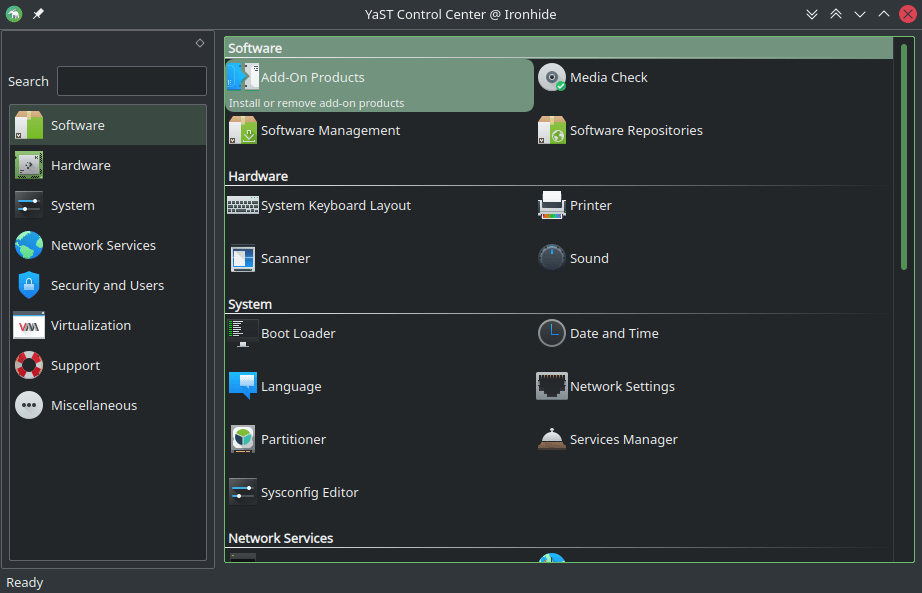
When the YaST Printer Module loads, in the left pane, select the Policies menu item and below the “Specify the operation policy” select “allowallforanybody” and select, the radio button beside “Apply this operation policy to all local printer configurations.

Select “OK” and then you will now be able to control your printer from the printer desktop applet without any additional authentication.
Bonus Method
Dale of Low Tech Linux has a method that is similar in how YaST would allow for users to print. In short, it completely removes authentication for local CUPS admin operations. Any local user (or process) can add/remove printers, change settings, with no password at all. Dale also includes the firewall steps for mDNS / IPP discovery, for automatic network printer detection.
https://lowtechlinux.com/2026/07/29/my-post-tumbleweed-install-to-dos-and-tips/
Final Thoughts
It’s good to know how your system works. This is a little thing that making this adjustment makes for a better desktop experience. This tweak obviously exists because in an enterprise environment, you may not want users to have control over the printer behaviors of a server, a machine with multiple users tied to it or some sort of locked down single user workstation on a manufacturing floor. I do think that it would make for a better openSUSE default desktop behavior if this particular configuration was default to the wheel group. A lesser privileged user wouldn’t have those abilities by default. I do admit that I may not see the bigger picture here and this is just an opinion.
References
https://yast.opensuse.org/
https://get.opensuse.org/
openSUSE Linux
Simplifying Admin Tasks in openSUSE with the Wheel Group


Leave a Reply