
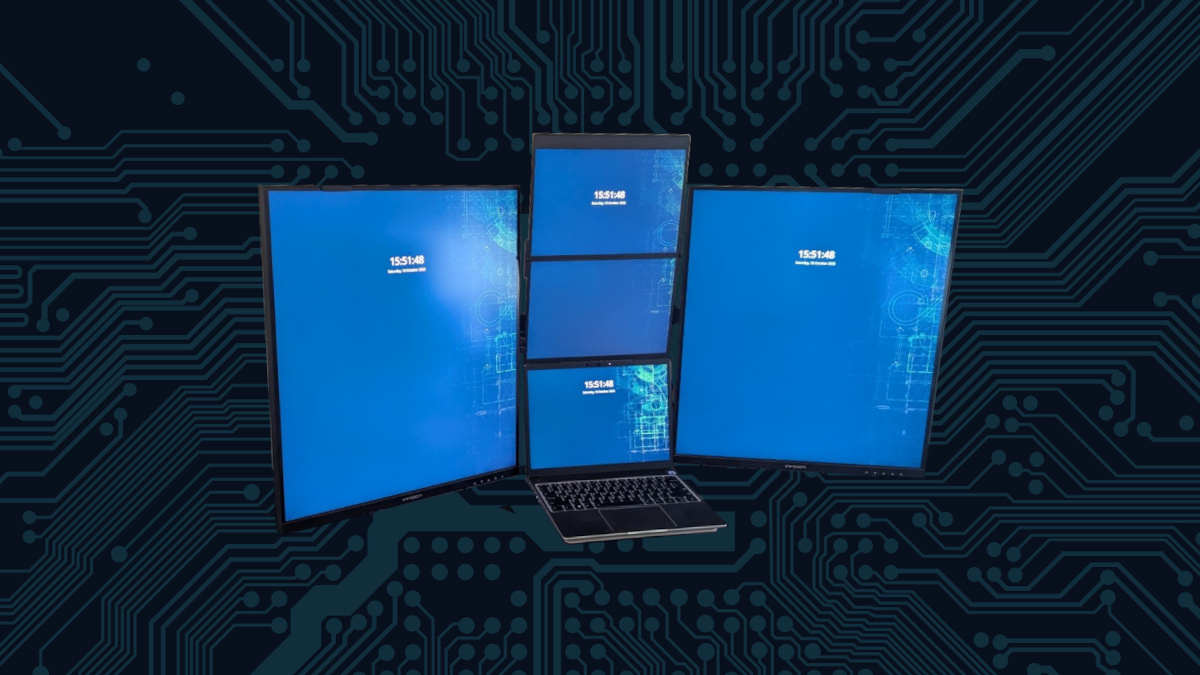
The six-monitor semi-portable rig that I was using with the Framework Laptop 13 was fun for what it was and surprisingly usable but the 13″ and 14″ monitors I was using weren’t quite cutting it. The FlipGo monitor was a fantastic improvement as it is the same size and pixel density of my Framework Laptop 13 but I found that I was not using the side monitors very much due to the lack of pixel density and the size. It was feeling a bit lacking, I liked it but I was having a few too many issues with it. Also I found myself looking downward too much, causing just a bit of neck strain. I wanted something better with more pixel real estate and less headache inducing. I needed an upgrade.

I was inspired by an upgrade in my office at “the plant,” an LG DualUP monitor that was an incredible enhancement. It is a massive 2560×2880 display made a huge productivity improvement. Having it right in front of me and splitting windows between the top and bottom with a quick Meta+cursor keys with the KDE Plasma tiling features made this a perfect monitor. My home office was starting to feel less and less enjoyable to use. I needed to make some changes.

I was between three different directions for my home office, SuperCubicle, monitor refresh. I had three design paths I wanted to go down for this monitor refresh. The first and easiest to conceptualize was replace the two side monitors with FlipGos. This was essentially very close to what was already sporting and would technically be less complex as, although there are 7 panels, they are logically only 4 screens. This would be very doable and clean.

The issue here is that I was still dealing with smaller screens but I was keeping the portability concept of the displays intact. Reviewing the price of the FlipGo monitors made this a rather premium decision for the number of pixels I am buying.
The second option I was kicking around was an ultrawide route. In this case, The top monitor would be a 1440p 45″ ultrawide and two 16:9 1440p screens below and the Framework maybe below that or off to the side. I really couldn’t get a good handle on how I wanted to do this one and the width of this would have been potentially too wide for my desk but the real sticking point was where the Framework would go. If it was under, the total height would have maybe been too high and if I put it off to the side, I’m not sure how much I would have liked it.

The problem with this arrangement was that I had a number of unknowns but the sweet spot was undoubtedly, having ultrawide on the top. I was envisioning how great this would be and the two more “normal” screens would be great for video conferencing and sharing my screen and so forth. This had a lot of real strong positives.
The third option was to go with two of those LG DualUp screens to flank either side of the Framework Laptop 13 and the FlipGo display. The problem with the LG was that the price was a little steep. Thankfully I found this INNOCN 28 Inch version that was nearly identical but had a spot on top for a webcam. I thought that was a pretty neat idea and it was about half the price.
I did what any reasonable, slightly tech obsessed enthusiast would do and turn my decision making vapor lock into a spreadsheet. Here I would look at the size pixels and pixel density.

Hardware Choice
To my surprise, the winner ended up being the Dual Up or Vertical display arrangement. It was the clear price winner, I had more pixels to work with than the FlipGo and would be generally symmetrical with the same workflow as what I had gotten accustom to using. The two Innocn 28C1Q SDQHD displays would replace the HP DisplayLink and the portable triple monitors that supported it. I also decided I would use this as an opportunity to elevate the displays as well as the Framework Laptop for better airflow and to maximize my desk space.
The goal here was to make my workstation as productive as possible and make the most efficient usage of the space available. This would require some extra hardware bits. The core of it, a dual Monitor Desk mount with a laptop stand. Additionally, an additional VESA mount (making it a triple monitor stand) for the FlipGo and the FlipGo Magnetic adapter to have everything up off the desktop surface.
The Stand Problem
As I was assembling the stand, I ran into a problem. The arms on the monitor desk mount were not long enough to provide space for the Laptop and FlipGo display. I ended up taking some measurements and printing off some extensions to attach the monitor pivot arms. The convenient aspect of this design was that I could telescope out the arms as much as I needed to line everything up.

Unfortunately, there is no setscrew to hold the arm in place but it is tight enough that there is no play and the monitors would have to wiggle out significantly, for which I would notice long before it would be at a state of concern.

Monitor Stand Arm Extension on Thingiverse
The included platform for the laptop stand was too big for the laptop and was causing me to be a bit annoyed by it. As a consequence, I modeled up a custom base for the Framework Laptop 13 with an opening for airflow and also convenient reliefs on either side so when I pick the computer up to take it on the go I don’t have to play this silly dance of getting my fingers between the stand and the laptop, I just grab it with my sausage fingers, unplug the USB-C cables and go.

Framework Laptop 13 VESA Platform on Thingiverse
Framework Laptop 13 VESA Platform on CubicleNate.com Shop
How It All Connects and Day-to-Day Use
The way that everything connects together is not as neat and tidy as I had originally imagined. I was hoping to run it all through the UGREEN Revodok Max that has 3 downstream Thunderbolt 4 ports. At the time of purchase, this one the only reasonably priced dock with downstream thunderbolt ports and that feature does appear to continue to be quite rare.

UGREEN Revodok Max on Amazon.com
When I plugged everything into this dock, only one of the flanking monitors would light up with their densely packed pixel glory. It appeared that I was attempting to push a few too many pixels with a single Thunderbolt port. In order to take advantage of this wall of light, when I dock, I have to plug in two Thunderbolt ports, one on each side. The left side drives the left monitor only while the right side, connects to the Ugreen dock that drives the right vertical monitor and the FlipGo perched just above the Framework Laptop.

The left most display is not always used and is driven off of a Dell DisplayLink dock station because the limit of the iGPU in my laptop is four displays. This 5th display is used as an extra monitor when I live stream Linux Saloon and share news stories, demonstrate software and the like. Otherwise, it is hooked up to my Commodore 64 Ultimate as my 8-bit work companion to remind myself of where I started this tech journey.
I run this all on my openSUSE Tumbleweed with KDE Plasma as my desktop environment. The fractional scaling per monitor is the only way I can accomplish this, pixel-wall, menagerie with some semblance of a cohesive experience when moving a window from a flanking display to the center displays. The Framework and FlipGo displays are scaled at 130% with the flanking vertical monitors at 100%. It’s not perfect pixel density but scaling beyond 130% on the Framework and things get a little too big. I think 135% or 140% would be closer but I just don’t like it. So, I have opted for what works best for me.
What I Like
I have a wall of display to see everything I am working on at once. This layout is exceeding my initial expectations. It is also quite reliable, what I mean by that is, the displays don’t blank out from time to time, and I don’t have to remind them, logically, where they exist in space. A few upgrades of Plasma Desktop ago things seemingly forgot where to “sit in class.” The DisplayLink displays had to be reminded a lot more often and I’m just not sure why.
The additional airflow by suspending the Framework Laptop 13 has made pushing this machine a lot less trivial. I don’t have to worry about thermal throttling even if I do silly things like span Minecraft across the displays. Everything just runs surprisingly well.

The desk mount really makes a huge difference with the usability of the desk. My room isn’t very big so desktop space comes at a premium for me and I am prone to litter my desk with more projects than I have space. Every square inch (or centimeter) counts.
What I Don’t Like
The pixel densities being what they are per screen and using the fractional scaling is just not quite perfect. It is very close and because of the bezels between the Framework and FlipGo displays, it largely makes up for the scaling discrepancy. What I really want just doesn’t exist and will never exist so this will have to do.
Since the monitor on the far left is not always connected, I am left with a single practical display for screen sharing. Sure, I can do some fancy things and share a boxed region of the other displays but it just isn’t all that practical and fiddly. This isn’t a big deal, it’s not an every day thing but it happens enough. I am also fine with just using the additional side screen when the need arises.
Having to plug in two Thunderbolt cables into the laptop is not what I was aiming for but it appears I am asking Thunderbolt to do more than what it was designed to do. Plugging in two cables is not the end of the world and I’m really not complaining here, I’m just stating I don’t like it as much as the one single cable I previously enjoyed with the smaller, lower resolution screens.
Final Thoughts
I really enjoy my workspace, not just a little but a lot. It’s easy to be productive at this standing desk with my unique monitor layout. I feel like this is the absolute best workstation that is uniquely made for the way I want to work. Is it a bit silly? Perhaps, Is there room for improvement, absolutely I just don’t know what I would want to do yet. I have three other locations I dock into, my lab, my Michigan plant office and my Texas plant office and without the slightest hesitation, this one is the best.
What pushed me to finally share all this was that I was asked where I got them. I looked up the vertical displays to see where they are currently, price wise and they are no longer available on Amazon. I am not sure where to get them now. The only source out there looks questionable, so I have removed that link.
I do hope that this monitor or monitors like this will come back to stores. It’s such a fantastic productivity monitor that would be great for any office. An alternative method would be to buy two 21:9 monitors and mount them vertically. It won’t be quite the same, but it would be fairly similar. The UGREEN dock can do two 4K screens at 60Hz so you would be able to get a very similar experience to what I have going on. I haven’t found anything I really like right now if I wanted to do this again but I’m sure something will come up.
The closest so far, would be this particular display, but I’m not sold on it.
https://innocn.com/en-us/products/innocn-34-5k2k-120hz-21-9-ultrawide-professional-monitor-34c1u
I also wanted to publish the CAD documents I designed for the unlikely instance that someone wanted to replicate or more likely, adapt a portion of this for their workspace. After all, that is the fun part about the Internet and I’d rather feed into the cool, things out there. Plus, it gives me an excuse to talk about the Framework Laptop 13 again. Anytime I can shoehorn it into a conversation or article, I’m basically going to do it.
References
Six Monitor Workstation for my Framework 13
https://jsaux.com/products/flipgo-portable-dual-monitor
LG DualUp Monitor Plus USB-C Dock Station
Monitor Stand Arm Extension on Thingiverse
https://www.printables.com/model/1795831-wali-dual-monitor-stand-arm-extensions/files
https://cults3d.com/en/3d-model/gadget/wali-dual-monitor-stand-arm-extensions
Framework Laptop 13 VESA Platform on CubicleNate.com Shop
Framework Laptop 13 VESA Platform on Thingiverse
https://www.printables.com/model/1795830-vesa-platform-stand-for-framework-laptop-13
https://cults3d.com/en/3d-model/gadget/vesa-platform-stand-for-framework-laptop-13
UGREEN Revodok Max on Amazon.com


Leave a Reply